
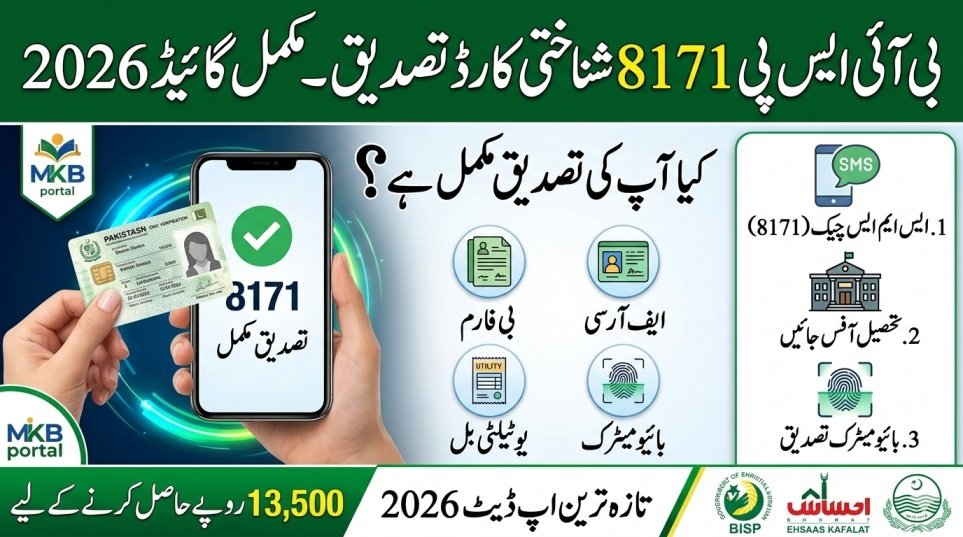
The BISP 8171 verification process 2026 is essential for families receiving financial support under the Benazir Income Support Programme (BISP) and the Ehsaas Kafalat Program. Many beneficiaries face payment delays due to incomplete, outdated, or mismatched records. To continue receiving your quarterly cash assistance, such as Rs. 13,500, you may need to visit your nearest BISP Tehsil Office for document verification. This guide explains the process in simple English and helps you complete verification smoothly.
| Topic | Key Info for BISP 8171 Verification 2026 |
|---|---|
| What is 8171? | Code & portal to check eligibility and payments |
| Official Website | 8171.bisp.gov.pk |
| CNIC Check Options | Online & SMS (send CNIC to 8171) |
| Payment Amount | Rs. 13,500 quarterly support |
| Verification Location | Nearest BISP Tehsil Office |
| Verification Method | Biometric + Document check |
| Required Documents | CNIC, B-Form, FRC, Utility Bill |
| Cost | Free |

What Is BISP 8171 & Why It Matters
The 8171 service links your CNIC to the BISP/Ehsaas Program database. By checking your CNIC, you can see if you are eligible for financial support, the status of your payments, and if a visit to a BISP Tehsil Office is required. The 8171 Web Portal allows real-time verification using your 13-digit CNIC, and any alert for “Under Verification” or “Verification Required” means you must update your documents.

Who Should Visit the BISP Tehsil Office
If your 8171 payment status shows:
- “Verification Required”
- “CNIC not found”
- “Data mismatch”
- “Under review”
- “Payment pending”
You must visit the nearest BISP Tehsil Office. This requirement applies to beneficiaries of BISP and the Ehsaas Kafalat Program.
Documents Required for Verification
Bring original documents with photocopies:
- CNIC (Computerized National Identity Card)
- B-Form of children, if applicable
- Family Registration Certificate (FRC)
- Registered mobile SIM in your name
- Utility bill (electricity/gas, if available)
- Disability certificate, if applicable
- Widow or elderly certificate, if applicable
Complete documents speed up verification and avoid delays.

Step-by-Step Process at Tehsil Office
The BISP 8171 verification usually takes 20–30 minutes. Follow this process:
- Visit the nearest BISP Tehsil Office early morning.
- Take a token from the reception desk.
- Wait for your turn.
- Submit CNIC and all documents to the BISP officer.
- Complete biometric verification via fingerprint scan.
- Officer updates your record in the system.
- Receive a confirmation slip or verbal confirmation.
Your record will sync with NADRA and NSER databases to ensure accuracy.
Biometric Verification & Importance
Biometric verification confirms identity and prevents fraud. Benefits include:
- Stop duplicate payments
- Ensure rightful beneficiaries receive support
- Confirm CNIC ownership
If fingerprints fail:
- Clean hands and retry
- Try a different finger
- Ask staff for another attempt
Alternative verification methods are available for exceptional cases.
Most Informative Data You Must Know
| Key 8171 Data | Explanation |
|---|---|
| Official Portal | 8171.bisp.gov.pk |
| Payment Amount | Rs. 13,500 quarterly |
| Verification Method | Biometric + Document check |
| SMS Checking | Send CNIC to 8171 |
| Common Delay Causes | Mismatched data, expired CNIC |
| NSER Role | National socioeconomic verification |
| Dynamic Survey | Updates household records |
| Support Channels | Tehsil Office & 8171 portal |
Helpline & Contact for BISP 8171 Queries
For assistance:
- Official Website: https://www.bisp.gov.pk
- 8171 Portal: https://8171.bisp.gov.pk
- BISP Helpline: 0800‑26477
- Tehsil Office Contact: Visit your local district office
Latest Update 2026 on Verification
In 2026, the 8171 system provides faster CNIC verification, real-time payment status updates, and reduced waiting times. The portal now has improved mobile-friendly features and better synchronization with NSER and NADRA, helping families check eligibility and payments without delay.
Conclusion
Completing BISP 8171 verification at the Tehsil Office ensures uninterrupted cash support. Bring all required documents, complete biometric verification, and check your CNIC status via online portal or SMS. Staying proactive in 2026 protects your eligibility and guarantees timely installments.
FAQS:
Can I check payment without visiting the office?
Yes, check online at 8171 portal or send CNIC via SMS to 8171.
Is verification free?
Yes, the process is completely free. Avoid anyone asking for payment.
Why did my payment stop after verification?
Payments pause if data is outdated, household info changed, or biometric failed. Re-verify at Tehsil Office.
Can I receive payment immediately after verification?
No, payments are updated in the next scheduled cycle after verification.
Latest Updates
 Fuel Subsidy for Motorcycles Sindh 2026 Eligibility via SMS
 Fuel Subsidy for Motorcycles Pakistan 2026 Eligibility via SMS
 Today Update: Kuwait Announces Monthly Allowance for Single Women – 2026 Social Welfare Update
 Today Update: Punjab Fake E‑Challan SMS Scam Alert 2026 — How to Protect Yourself Online
 Latest Update: How To Apply Online For Himmat Card 2026 – Complete & Updated Guide
 Latest Update: Step-by-Step Guide to Register a Complaint via Helpline 1000
 Latest Update: Punjab Class 9 Exam Date Sheet 2026 – Full Schedule Announced
 Latest Update: 8171 Web Portal Balance Check by CNIC 2026 – Complete Guide