
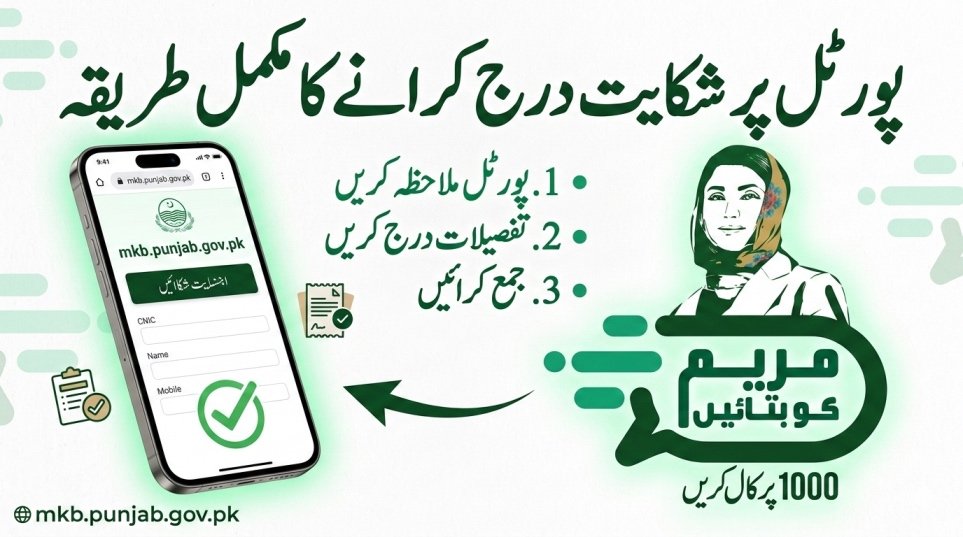
The Punjab Government has launched a digital complaint system under the “Maryam Ko Batayn” initiative to help citizens register grievances without visiting any office. If you are facing issues related to financial relief, Ramzan packages, payment delays, or administrative problems, you can use the official portal to submit your complaint online.
This integrated platform ensures that your complaint directly reaches the concerned department and relevant district officer. It provides transparency, accountability, and fast resolution for public service issues.
Below is the complete information you need to understand and use the system properly.
| System Feature | Authentic Information |
|---|---|
| Official Web Portal | mkb.punjab.gov.pk |
| System Name | Maryam Ko Batayn (MKB) |
| Toll-Free Helpline | 1000 (Zero-rated short code) |
| SMS Services | 8070 and 9999 |
| Operating Authority | Punjab IT Board (PITB) |
| Service Availability | 24/7 Support |
| Coverage Area | All Districts of Punjab |
| Main Purpose | Public Relief and Complaints |
| Required Information | Explanation for Users |
| Applicant Information | Details Required |
|---|---|
| Applicant Full Name | Your real name as printed on your ID card |
| 13-Digit CNIC | Your National ID without dashes |
| Mobile Number | Active SIM registered on your CNIC |
| District Name | Your current living city in Punjab |
| Complaint Category | Select the exact type of your issue |
| SMS Verification | Mention if you received message from 9999 |
| Issue Description | Short explanation of your problem |
| Proof Attachment | Screenshot of error or message (Optional) |

Understanding the MKB Portal
Maryam Ko Batayn is a centralized digital grievance system developed by the Punjab Information Technology Board. The main objective is to connect citizens directly with government authorities.
When you submit a complaint, the system automatically assigns your case to the relevant officer. A specific time limit is given for resolution. Officers must provide updates and upload proof if required before closing the ticket.
This mechanism increases accountability and reduces corruption in relief distribution and public service management.

Who Can Use This Portal
The system is designed for residents of Punjab who face problems with government services or welfare programs.
You can use it if:
- You applied for a relief package but did not receive payment.
- You sent your CNIC to 8070 or 9999 and got no response.
- Your eligibility status is incorrect.
- OTP is not received on the mobile app.
- Funds are approved but not transferred.
- You experience delays in ration distribution.
- Someone demands commission from your relief amount.
Senior citizens and widows who cannot visit offices physically are highly encouraged to use this online system.
Step-by-Step Guide to File a Complaint
Filing a complaint is simple and takes only a few minutes.
- Visit the official website: mkb.punjab.gov.pk
- Click on “Register Complaint” or “Complaint Form.”
- Enter your full name, 13-digit CNIC, and active mobile number.
- Select the correct complaint category from the list.
- Write a clear description of your issue and attach proof if available.
- Submit the form.
After submission, the system generates a unique reference number. Keep this number safe for future tracking.

Common Issues You Can Report
The portal handles different types of service problems including:
Payment Delays
If approved funds are not received in your bank account or mobile wallet, submit a complaint immediately.
OTP Errors
If verification codes are not delivered, report the technical issue through the system.
Fake Deductions
If anyone asks for commission from your relief money, file a complaint with proof.
Helpline Problems
If the toll-free number 1000 is busy or not responding, use the web portal as an alternative.
Eligibility Mistakes
If the SMS system wrongly declares you ineligible despite being deserving, request manual review.
Missing Rations
If promised relief items were not delivered to your house, submit a case through the portal.
Tracking Your Complaint Status
After submission:
- Visit the portal again
- Click on “Track Complaint”
- Enter your reference number or CNIC
The system will show one of these statuses:
Pending
In Progress
Resolved
If your case shows “Resolved” but your problem is not fixed, you can reopen the ticket or contact the 1000 helpline for further action.
Fast Resolution Process
The MKB portal works on an automated accountability system.
When you submit a complaint:
- It is assigned to the relevant district officer.
- A time limit is activated for resolution.
- Officers must upload photo or video proof before closing the case.
If the officer fails to respond within the assigned time, higher authorities receive automatic alerts.
This system reduces paperwork and ensures transparency in government relief programs.
Frequently Asked Questions
- Is filing a complaint free?
Yes. The portal and helpline services are completely free. - What if the website is not loading?
You can use the mobile app or call the toll-free number 1000 for support. - How long does resolution take?
Most digital complaints are resolved within 24 to 72 hours depending on verification. - Can people outside Punjab use it?
No. The system is only for residents of Punjab with valid provincial address in their CNIC.
Conclusion
The Maryam Ko Batayn portal (mkb.punjab.gov.pk) provides a transparent and efficient way for citizens to register complaints and track government services. Instead of visiting offices and waiting in long queues, you can submit your issue online in minutes.
Always enter correct information, save your reference number, and monitor the status regularly to ensure quick resolution.
Latest Updates
 Fuel Subsidy for Motorcycles Sindh 2026 Eligibility via SMS
 Fuel Subsidy for Motorcycles Pakistan 2026 Eligibility via SMS
 Today Update: Kuwait Announces Monthly Allowance for Single Women – 2026 Social Welfare Update
 Today Update: Punjab Fake E‑Challan SMS Scam Alert 2026 — How to Protect Yourself Online
 Latest Update: How To Apply Online For Himmat Card 2026 – Complete & Updated Guide
 Latest Update: Step-by-Step Guide to Register a Complaint via Helpline 1000
 Latest Update: Punjab Class 9 Exam Date Sheet 2026 – Full Schedule Announced
 Latest Update: 8171 Web Portal Balance Check by CNIC 2026 – Complete Guide